3.7
Free
TinyTask
A lightweight, powerful automation tool

View an ad to download for free

Mpowersaver utility that helps user to turn off the Desktop or Laptop screen whenever users lock their machines or by pressing a hotkey. Mpowersaver also allows you to schedule your computer to hibernate, stand by, restart, or shutdown the computer or laptop in a definite period of time.
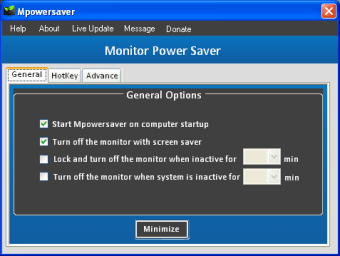
-*- General Settings of Mpowersaver:-
--Automatically Turn off the monitor when user lock down their system (Win +L).
--Automatically Turn off the monitor with screen saver starts. (Click check box to activate).
--Automatically Lock and Turn off the monitor when system is in inactive mode. (Set time to activate).
--Automatically Turn off the monitor when system is in inactive mode. (Set time to activate).
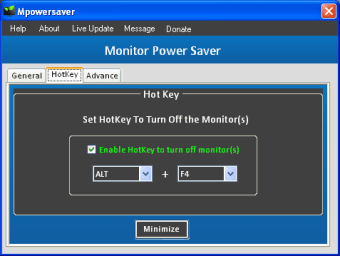
-*- Hotkey Settings of Mpowersaver:-
--Check the **Enable Hotkey to turn off monitor(s)** to enable the Hotkey, uncheck it to disable it. Select the key combination that you would like to assign to turn off the monitor.
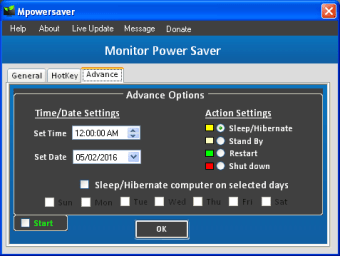
-*- Advance Settings of Mpowersaver:-
-- Daily basis:- For example, let’s say you want to set your computer to shutdown in fifteen minutes. First select the Action Settings (Sleep/Hibernate, Standby, Restart or Shut down), then set the time and date. Once that is complete you must click the (Start) check box and click (OK) button.
-- Weekly basis:- For example, let’s say you want to set your computer to shutdown every day at 11:00:00 PM. First select the Action Settings (Sleep/Hibernate, Standby, Restart or Shut down), then set the time. Once that is complete you must click the (Shut down Computer on selected days) check box and select the days (Sun, Mon, Tue.Wed, Thu, Fri, Sat) you want to shutdown your computer, and click the (Start) check box and click (OK) button.
-*- Supports:-
-- Mpowersaver Works With Desktop (Single/ Dual) Monitors and Laptop.
-- Mpowersaver Works With Windows 10, Windows 8.1, Windows 8, Windows 7, Windows Vista, Windows XP.

Monitor power saver in a quick keystroke

DeskLock: A Free Windows File Manager

Power profile management tool for PC
Free
Windows
Windows Vista
English
1.9K
93.74 KB
View an ad to download for free
Have you tried Monitor Power Saver? Be the first to leave your opinion!
Add reviewMonitor power saver in a quick keystroke
DeskLock: A Free Windows File Manager
Power profile management tool for PC

Enhance Your Mobility with DH Mobility Modder
Get ultimate computer performance
Efficient Screen Management with Monitor Off Utility
Powerful NT defrag tool
Optimize Your System with Granola

Safely Remove: Essential Tool for Windows Users
Check the ongoing usage of memory and free it up when required

Efficient Multimedia Broadcasting with Prog Media Server
Find and eliminate duplicate songs

Enhance Prolog with Logtalk's Advanced Features
A free app for Windows, by INTEL CORP.
Extended window manipulating capabilities
Quick and simple file management
Text analysis tool, counting frequencies of words and phrases in text
Modify the dates of files

Install the latest driver for HP officejet j4540 all in one printer

Install the latest driver for compaq cq58